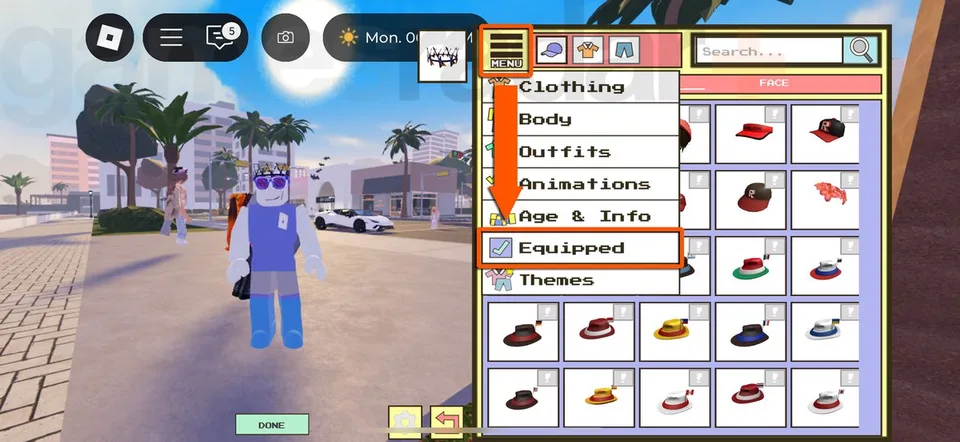
Berry Avenue does not use a developer promo-code box for cash. A "code" is a Roblox catalog asset number. Wearables and house pictures use different menus.
Import a wearable
- Open the item on the Roblox catalog and copy only the digits from the URL or item page.
- In Berry Avenue, press Avatar on the right side.
- Open Menu, then Equipped.
- Press Import ID.
- Paste the digits with no spaces and press Add.
If the game says the item is not on sale, the catalog listing was removed or limited. Move to another ID. Each wearable import is per account, and an ID that worked last month can fail after the creator takes it off sale.
Picture frames
- Own a house first.
- Go inside and click a picture frame.
- Type the picture ID and confirm.
A number that fails in Import ID can still be a wall image, and the reverse is also true. The codes page labels picture IDs separately. Three wearable IDs, 11712511561, 11251388730, and 11095198309, appear in both a live column and an expired section of the same roundup, so they are filed as expired until you retest them.
Safety
- Roblox does not need your password to import an item.
- Do not download an executor, complete a survey, or type a one-time code to "unlock" an ID.
- Compare the catalog name and creator with the list before you trust a label. Several pants and necklaces share generic names but different numbers.
- The catalog item named Money does not add a town balance. Berry Avenue has no documented paycheck.
Build the face and hair first if you want strangers to read the character quickly, then add one bag, glasses, or hair clip that stays constant across outfits. School groups often publish their own uniform colors. Check that group's rules before you copy a random uniform. Details are in the school outfit guide.